Multiple network cards and VLANs in the DR
How to declare several interfaces and several VLANs on a protected server, what Sefthy builds in the cloud and what the connector has to do.
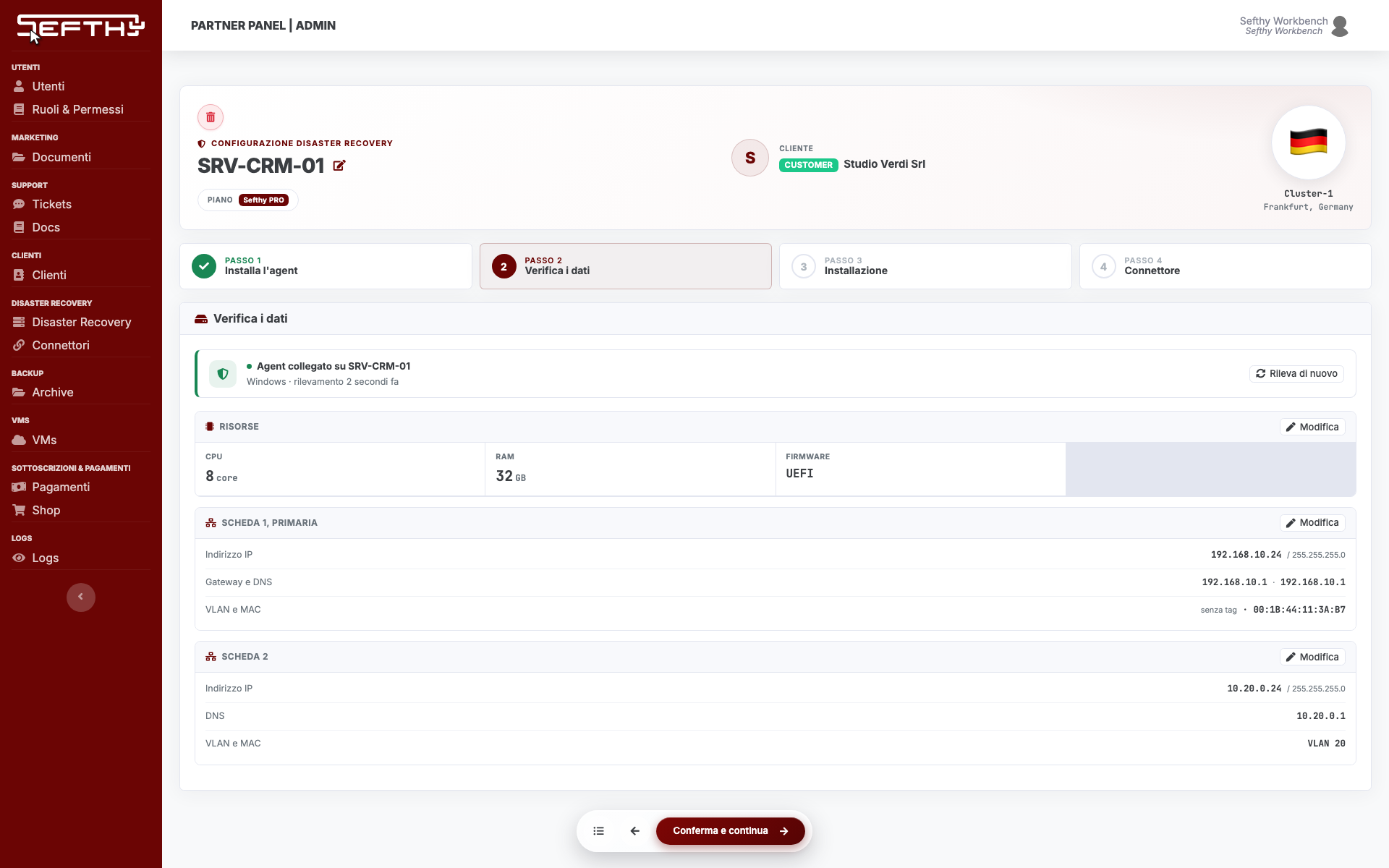
A protected server can have several network cards, and those cards can sit on different VLANs. Sefthy recreates all of them on the restored machine, with the same addresses and on the same VLANs, as long as you declare them on the DR.
Where the cards are declared
The cards live in the DR setup wizard, in the Network cards section.
With the Sefthy Agent the fields arrive already filled in. The agent reads every interface on the server and reports IP address, netmask, gateway, DNS, VLAN and MAC address, and at the Verify the detected data step you review and confirm it.
If you fill them in by hand, each card takes four values plus the VLAN.
- IP Address and Netmask of the card.
- Gateway, on the first card only, the one tagged primary.
- DNS.
- VLAN, a number between 1 and 4094. An empty field counts as VLAN 1, that is untagged traffic.
Add network card adds another one, the bin icon removes it. Order matters, the first card is the primary one and it is the one the restored machine uses to get out.
One cloud extension per VLAN
From the cards you declared Sefthy builds the extension of the site network towards the cloud. There is one rule, one extension per distinct VLAN, not per card.
A DR with three cards on VLAN 10, VLAN 10 and VLAN 20 uses two extensions, not three. A DR with two untagged cards uses a single one, because untagged traffic counts as VLAN 1 exactly like the others. And if two DRs on the same connector both have a card on VLAN 10, that VLAN 10 travels inside the same extension, it is the same network of the same customer.
When you start the DR, the machine that comes up in the cloud gets one card for every card you declared, in the same order and with the right tag. The rest is prepared at that moment and taken down when the machine is destroyed.
What changes on the connector
Nothing, as far as your own configuration goes. The connector receives the map of VLANs to carry from the Console and configures itself.
What has to be right is the network around it. The switch port stays a trunk, and if you change the interface used for the Cloud Extension the new port has to be set up the same way, as covered in Change the network interface used for the Cloud Extension.
Changing the cards after setup
On the DR page open the three dot menu, More actions, and pick Settings. From there you add a card, fix an address, change a VLAN and save. On save the cloud extensions realign themselves to the new VLANs.
It only works with the DR at rest. While a restore is running the entry is not there, because those values are the ones the machine came up with. The detail of the modal is in DR settings after setup.
When the VLAN changes on the server
If somebody moves the server to another VLAN, or adds or removes a card, the agent notices and the DR page shows The server network has changed.
With Review and apply you see the comparison field by field, the value on record and the one detected, with the cards marked as changed, new or removed on the server. You confirm and the record realigns, along with the cloud extensions. With Reject nothing changes and the proposal does not come back until the server network changes again.
It pays to accept quickly. While the record lags behind a restore would use the old addresses, and a wrong VLAN is something you discover at the worst possible moment. The full round is in Server health and network drift.